Alex Chalkias
on 29 May 2020
Kubernetes has been successful for a number of reasons, not the least of which is that it takes care of things that application developers may not want to bother with – such as, for example, networking. Multus is a feature that can be used on top of Kubernetes to enable complex networking use cases.
Kubernetes networking
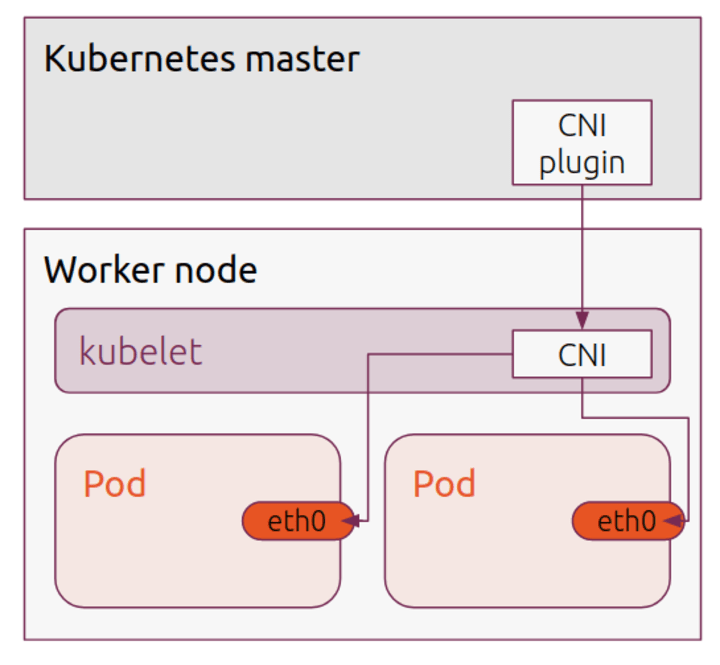
The standard networking scenario in Kubernetes is that each pod has a single network interface (eth0). The pod behaves like a single host, which can communicate with every other host on the same node, and usually with all other nodes on the network, depending on the Container Network Interface(CNI) in use. It is a simplistic but powerful approach – for the most part, the application developer concentrates on what is happening inside the container, and trusts the orchestration ability of Kubernetes to handle the plumbing of network functionality.
Kubernetes CNI plugins and use cases
Kubernetes itself manages this interface using plugins. The whole purpose of CNI is to have a framework for dynamically allocating network resources over the lifecycle of a container. The CNI plugin is called when a container is created, creates and adds an interface, connects the interface to the host network via a bridge and then configures the interface, usually with an additional IP Address Management component to supply an address and routes.
A typical (and often the default) example of a CNI plugin is Flannel. Flannel configures a layer 3 IPv4 overlay network. Each node allocates IP addresses within a subnet for local communication, and Flannel takes care of encapsulating traffic between nodes. By comparison, another popular CNI is Calico, which instead uses Border Gateway Protocol (BGP) to route traffic between hosts. There are many varied and useful CNI plugins to address all sorts of usage scenarios. But, without Multus, you are limited to using one, and they in turn are all limited to a single interface.
This can be restrictive. There are plenty of cases where it may be desirable to have additional network capability:
- Separation of data/control planes
- Monitoring
- Multi-tenant networks
- Specific hardware support (e.g. SR-IOV)
- Specific topology support
How does Multus work
This is the issue Multus was designed to solve. Although it is disguised as a CNI plugin, Multus doesn’t really do anything more than load other CNI plugins. It is really a CNI manager, which allows the creation of multiple interfaces, which can then be controlled by the same or different CNI plugins.
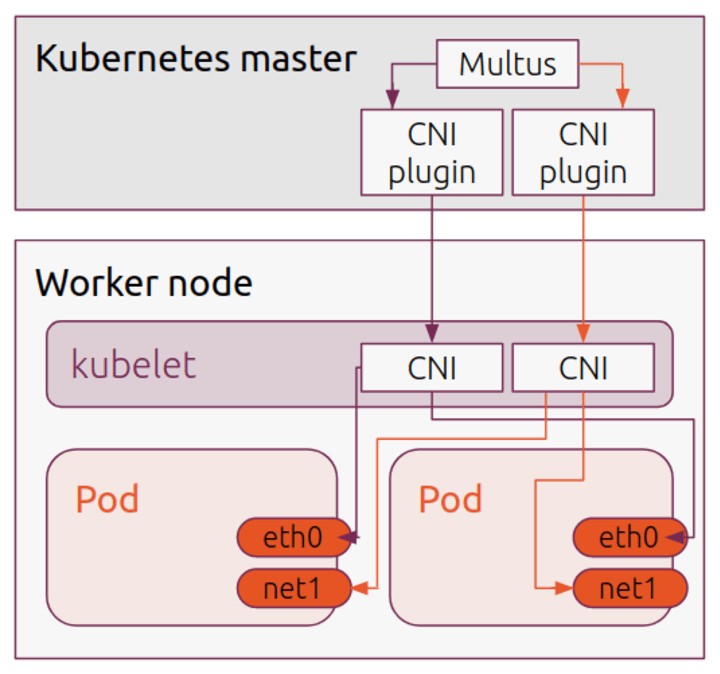
The initial, default interface is still used as normal, but additional interfaces are now available when specified during Pod creation. The mechanism Multus uses is to create a new Custom Resource Definition (CRD) to describe the additional interface mechanism. For each additional CNI type, a “NetworkAttachmentDefinition” is generated (see the Multus docs for more information on this).
Created pods can invoke this annotation to easily add new interfaces, e.g.:
apiVersion: v1
kind: Pod
metadata:
  name: ubuntu
  annotations:
    k8s.v1.cni.cncf.io/networks: flannel, flannel
spec:
  containers:
  - name: ubuntu
    image: ubuntu
    command: ['sleep', '3600']
The ‘k8s.v1.cni.cncf.io/networks flannel, flannel’ annotation will in this case add two flannel interfaces (net1, net2), in addition to the default eth0 interface.
Multus with Charmed Kubernetes
Of course, Multus requires some additional setup itself, but if you are running Kubernetes on Ubuntu, you can take advantage of Charmed Kubernetes, to deploy and configure it with the minimum of fuss. Multus support was added in the 1.18 release of Charmed Kubernetes (see the release announcement for more details)
For complete instructions on setting up Multus on Charmed Kubernetes, check out the documentation.